> ## Documentation Index
> Fetch the complete documentation index at: https://docs.trymeridian.com/llms.txt
> Use this file to discover all available pages before exploring further.
# Crawlers
> Track AI crawler visits to your site and diagnose discovery issues that prevent citations.
Crawlers helps you understand whether AI systems are **discovering and visiting your website**. This matters because crawlers are often the first step in the chain that leads to citations and visibility: if important pages are not being visited, it becomes much harder for those pages to become reliable sources in AI answers.
 Crawlers is also a practical way to validate that your website changes are being picked up. After you publish a new guide, update a category page, or fix technical issues, you can use this dashboard to see whether AI crawlers started visiting those pages more frequently.
Crawler visits do not guarantee citations. However, if your key pages are not being crawled, it is much harder for them to be cited consistently.
## What the Crawlers dashboard shows
When Crawlers is connected, you’ll typically see:
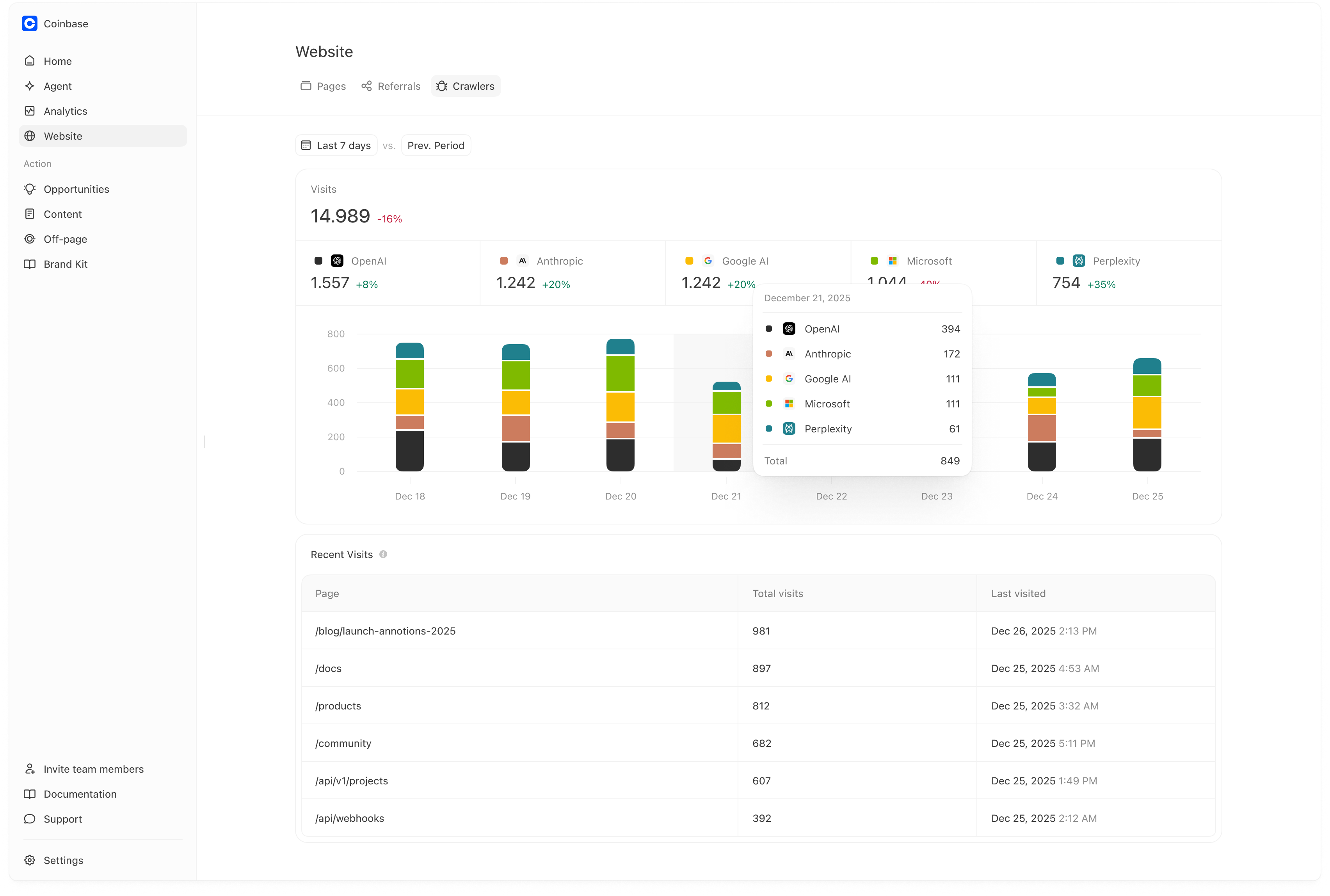
* **Total visits** from AI crawlers/bots in the selected time range, with a comparison versus the previous period.
* A **platform breakdown** of crawler visits (for example: OpenAI, Anthropic, Google AI, Microsoft, Perplexity).
* A **trend chart** so you can spot spikes, drops, and steady growth.
* A **Recent Visits** table that shows:
* which pages are being visited most,
* total visits per page,
* and when each page was last visited.
### How to read the trend chart
The trend chart is most useful for answering:
* “Did crawler activity increase after we published or updated pages?”
* “Did crawler activity drop after a site change?”
* “Which platforms are contributing most to discovery right now?”
A steady increase is usually a good sign. A sudden drop is a reason to check robots, sitemaps, internal linking, or site health.
## How teams use Crawlers (practical workflow)
A simple way to use this page week to week:
1. **Confirm discovery is happening at all.**
If crawler visits are consistently present, your site is being discovered.
2. **Validate changes after publishing.**
After you publish new content or update a key page, check whether that URL starts appearing (or increases) in Recent Visits.
3. **Prioritize discovery fixes before content scale.**
If crawler visits are absent or extremely low for key pages, focus on discovery first. Publishing more content typically won’t help until those pages can be found.
4. **Use it as a leading indicator.**
Improvements in crawl activity often show up before improvements in owned citations and prominence. If you see crawler visits increasing on key pages, it’s often a sign you’re moving in the right direction.
## Connecting Crawlers (Vercel)
Right now, Crawlers supports a **Vercel integration**.
If you haven’t connected it yet, you’ll see an empty state prompting you to connect:
1. Go to **Website → Crawlers**
2. Click **Connect Vercel**
3. Authorize the integration
Once connected, Meridian will begin showing AI crawler/bot visit insights based on the data available through Vercel.
We currently support Vercel and plan to add additional hosting/log integrations over time.
## Common reasons crawler activity is low
If you are seeing little or no crawler activity, these are the most common causes:
* **Robots.txt rules block important paths.**
This can prevent crawlers from accessing your category pages, product pages, or key guides.
* **Key pages are noindex or canonicalized away.**
If your important pages aren’t indexable or are canonicalized to other URLs, crawlers may deprioritize them.
* **Sitemaps are missing or incomplete.**
Crawlers often use sitemaps to discover new and updated pages efficiently.
* **Important pages are not reachable via internal linking.**
If your key pages are not linked from navigation or hubs, crawlers may not find them consistently.
* **Performance issues make pages slow or unstable.**
Slow or error-prone pages can be crawled less frequently.
If discovery is blocked, publishing more content usually does not help. Fix crawlability first.
## A practical crawler debugging checklist
Use this checklist when crawl activity looks lower than expected:
1. **Confirm robots.txt allows crawling for key paths.**
Pay special attention to category, product, pricing, and “source page” URLs.
2. **Confirm your most important pages are linked from navigation and/or category hubs.**
A page that isn’t linked is often a page that won’t be crawled consistently.
3. **Confirm sitemaps include the pages you want crawled and cited.**
Make sure new content is in the sitemap and that the sitemap is accessible.
4. **Fix template-level technical issues surfaced in Website → Pages.**
If a template affects hundreds of pages, fixing it once can dramatically improve crawl coverage.
5. **Re-check crawl activity after the next refresh cycle.**
Crawl changes are not always immediate. Look for a trend over days, not minutes.
## Measuring impact
Crawler improvements often show up in this order:
1. **More crawler activity on key pages** (especially new/updated guides and hubs)
2. **More owned pages appearing as citations** (Analytics → Citations)
3. **Improved prominence on prompts that rely on those pages** (Analytics → Prompts)
If crawler activity increases but citations do not, the next constraint is usually page quality and citeability (structure, FAQ/schema, evidence), not discovery.
Crawlers is also a practical way to validate that your website changes are being picked up. After you publish a new guide, update a category page, or fix technical issues, you can use this dashboard to see whether AI crawlers started visiting those pages more frequently.
Crawler visits do not guarantee citations. However, if your key pages are not being crawled, it is much harder for them to be cited consistently.
## What the Crawlers dashboard shows
When Crawlers is connected, you’ll typically see:
* **Total visits** from AI crawlers/bots in the selected time range, with a comparison versus the previous period.
* A **platform breakdown** of crawler visits (for example: OpenAI, Anthropic, Google AI, Microsoft, Perplexity).
* A **trend chart** so you can spot spikes, drops, and steady growth.
* A **Recent Visits** table that shows:
* which pages are being visited most,
* total visits per page,
* and when each page was last visited.
### How to read the trend chart
The trend chart is most useful for answering:
* “Did crawler activity increase after we published or updated pages?”
* “Did crawler activity drop after a site change?”
* “Which platforms are contributing most to discovery right now?”
A steady increase is usually a good sign. A sudden drop is a reason to check robots, sitemaps, internal linking, or site health.
## How teams use Crawlers (practical workflow)
A simple way to use this page week to week:
1. **Confirm discovery is happening at all.**
If crawler visits are consistently present, your site is being discovered.
2. **Validate changes after publishing.**
After you publish new content or update a key page, check whether that URL starts appearing (or increases) in Recent Visits.
3. **Prioritize discovery fixes before content scale.**
If crawler visits are absent or extremely low for key pages, focus on discovery first. Publishing more content typically won’t help until those pages can be found.
4. **Use it as a leading indicator.**
Improvements in crawl activity often show up before improvements in owned citations and prominence. If you see crawler visits increasing on key pages, it’s often a sign you’re moving in the right direction.
## Connecting Crawlers (Vercel)
Right now, Crawlers supports a **Vercel integration**.
If you haven’t connected it yet, you’ll see an empty state prompting you to connect:
1. Go to **Website → Crawlers**
2. Click **Connect Vercel**
3. Authorize the integration
Once connected, Meridian will begin showing AI crawler/bot visit insights based on the data available through Vercel.
We currently support Vercel and plan to add additional hosting/log integrations over time.
## Common reasons crawler activity is low
If you are seeing little or no crawler activity, these are the most common causes:
* **Robots.txt rules block important paths.**
This can prevent crawlers from accessing your category pages, product pages, or key guides.
* **Key pages are noindex or canonicalized away.**
If your important pages aren’t indexable or are canonicalized to other URLs, crawlers may deprioritize them.
* **Sitemaps are missing or incomplete.**
Crawlers often use sitemaps to discover new and updated pages efficiently.
* **Important pages are not reachable via internal linking.**
If your key pages are not linked from navigation or hubs, crawlers may not find them consistently.
* **Performance issues make pages slow or unstable.**
Slow or error-prone pages can be crawled less frequently.
If discovery is blocked, publishing more content usually does not help. Fix crawlability first.
## A practical crawler debugging checklist
Use this checklist when crawl activity looks lower than expected:
1. **Confirm robots.txt allows crawling for key paths.**
Pay special attention to category, product, pricing, and “source page” URLs.
2. **Confirm your most important pages are linked from navigation and/or category hubs.**
A page that isn’t linked is often a page that won’t be crawled consistently.
3. **Confirm sitemaps include the pages you want crawled and cited.**
Make sure new content is in the sitemap and that the sitemap is accessible.
4. **Fix template-level technical issues surfaced in Website → Pages.**
If a template affects hundreds of pages, fixing it once can dramatically improve crawl coverage.
5. **Re-check crawl activity after the next refresh cycle.**
Crawl changes are not always immediate. Look for a trend over days, not minutes.
## Measuring impact
Crawler improvements often show up in this order:
1. **More crawler activity on key pages** (especially new/updated guides and hubs)
2. **More owned pages appearing as citations** (Analytics → Citations)
3. **Improved prominence on prompts that rely on those pages** (Analytics → Prompts)
If crawler activity increases but citations do not, the next constraint is usually page quality and citeability (structure, FAQ/schema, evidence), not discovery.